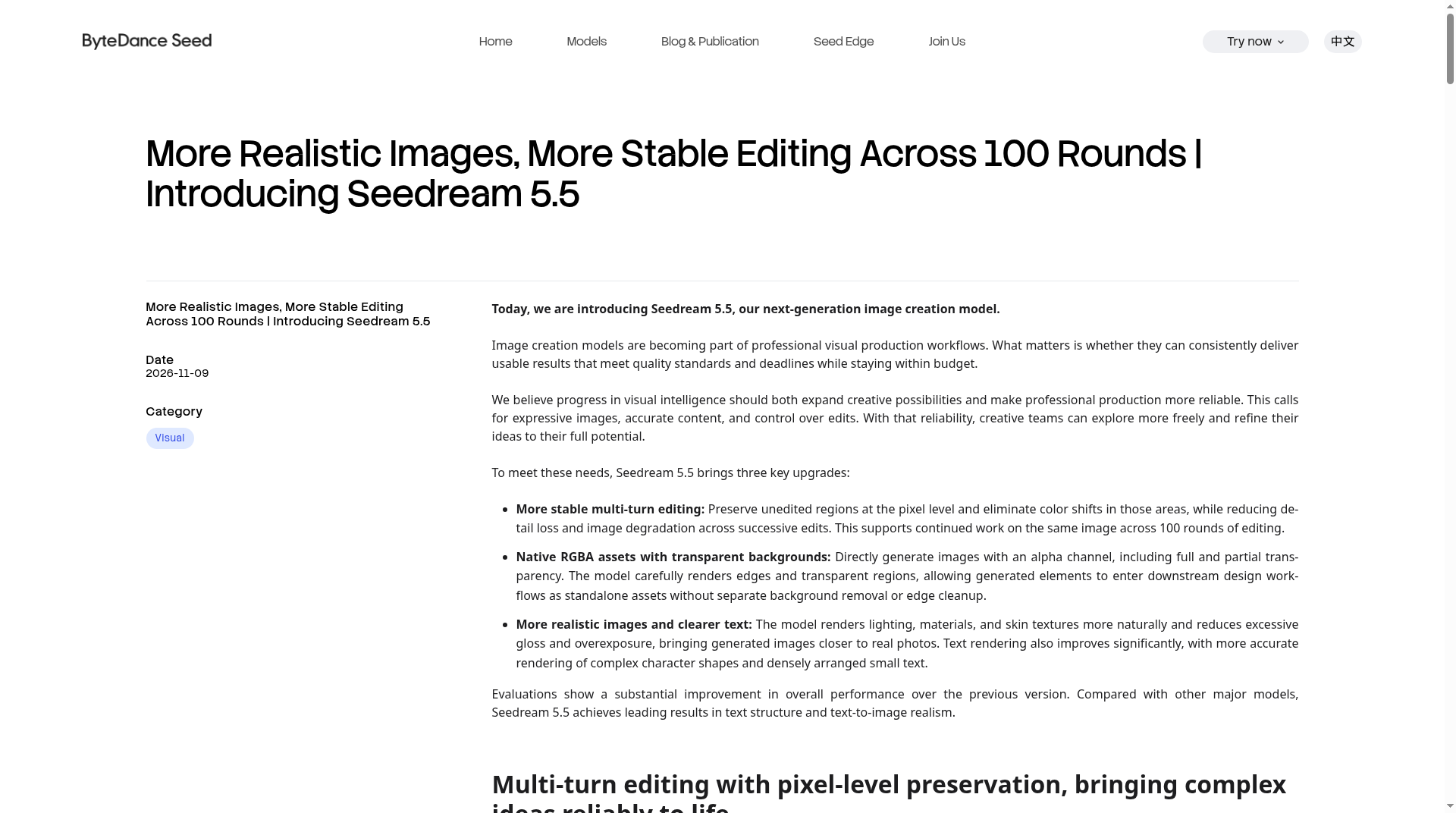
Seedream 5.5 is ByteDance Seed’s next-generation image creation model, officially introduced on November 9, 2026. The Seed team frames it as a production-oriented upgrade: more stable multi-turn editing, native RGBA assets with transparent backgrounds, and more realistic lighting, materials, and text. On BytePlus ModelArk, the same model is documented as Dola Seedream 5.5, with the model ID dola-seedream-5-5-261028.
That combination is the practical story. Seedream 5.0 already handled text-to-image, image-to-image, and layer decomposition. Seedream 5.5 keeps those workflows and tightens the parts that usually break in real production: unchanged regions drifting across edits, messy cutouts, and small or dense text that falls apart. Official docs also add finer layer decomposition and rich-text OCR, which 5.0 Pro and 5.0 Flash do not offer.
What ByteDance announced on November 9
The official Seedream 5.5 announcement and the Seedream 5.5 product page highlight three upgrades:
- More stable multi-turn editing. The model is trained to preserve unedited regions at the pixel level and to avoid color shifts in those areas, while reducing detail loss as one output becomes the next input. The Seed team says this supports continued work on the same image across 100 rounds of editing. Official demos include repeated clothing and accessory changes on a person, floral still-life replacements, and an interior that keeps perspective and occlusion coherent as furniture moves.
- Native RGBA assets. Seedream 5.5 can generate images with an alpha channel, including full and partial transparency, and is described as carefully rendering edges and transparent regions. The intended use is downstream design work—stickers, icons, product cutouts, typography assets—without a separate background-removal pass. Assets can be generated from text or from reference images.
- More realistic images and clearer text. Official copy says the model renders lighting, materials, and skin textures more naturally and reduces excessive gloss, overexposure, and blotchy textures. Text rendering is also called out as a focus, including complex character shapes and densely arranged small text in English and Chinese.
The Seed team also says a Pro version of the Seedream 5.5 series will follow. No release date is given in the announcement.
Official capabilities vs Seedream 5.0
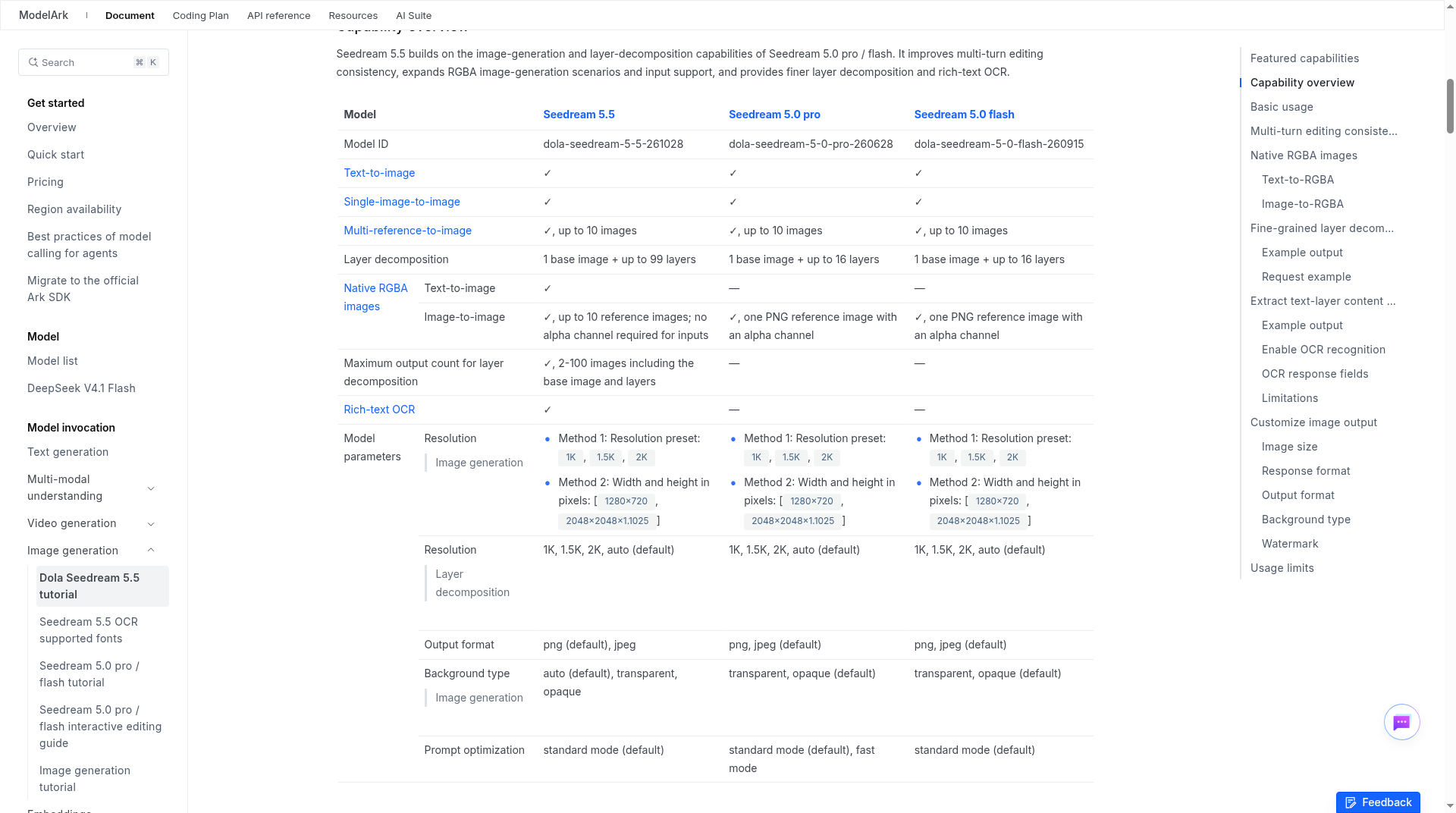
BytePlus’s Dola Seedream 5.5 tutorial (last updated November 13, 2026) is the clearest official comparison. Seedream 5.5 supports text-to-image, single-image-to-image, and multi-reference-to-image generation with up to 10 reference images—the same input pattern as Seedream 5.0 Pro and 5.0 Flash. The differences that matter in the official table are:
- Layer decomposition: Seedream 5.5 can return one base image plus up to 99 layers. Seedream 5.0 Pro and 5.0 Flash top out at one base image plus 16 layers. 5.5 also lets you set a maximum output count of 2–100 images, including the base image and layers.
- Native RGBA: 5.5 can generate RGBA from text, or from up to 10 reference images that do not need an alpha channel. Official docs say 5.0 Pro and Flash support image-to-RGBA only from a single PNG reference that already has an alpha channel, and do not list text-to-RGBA.
- Rich-text OCR: unique to 5.5 in this comparison. For regular text layers, the model can return text content, position, and approximate styling so a design tool can keep editing the type.
- Output defaults: PNG is the default output format on 5.5 (JPEG is also supported). The default background mode is
auto, withtransparentandopaqueas explicit options. Resolution presets are1K,1.5K, and2K, with2Kas the default for image generation. You can also set exactwidthxheightvalues in a documented pixel range from1280x720(921,600 pixels) up to2048x2048 × 1.1025(4,624,220 pixels), with aspect ratios from 1/16 to 16.
Official docs recommend a practical habit for multi-turn editing: use an RGB image without an alpha channel as the next-turn input, and set background to opaque while you iterate. That is the opposite of what you want when the final deliverable is a transparent asset, so it is worth treating “editing passes” and “RGBA export” as two different settings rather than one default for everything.
Layer decomposition and rich-text OCR
Layer decomposition is the other production-facing feature official docs spend time on. Seedream 5.5 can split one image into a base image plus independently editable layers (up to 99). In this mode, output_format applies only to the base image; official docs say layers are always returned as PNG, and passing the background parameter causes an error. Resolution for decomposition uses presets only: 1K, 1.5K, 2K, or auto (the default). The base image keeps the source aspect ratio; each layer stays close to the requested size while keeping its own aspect ratio from the source.
Rich-text OCR is more limited than the headline suggests, and the official limitations are worth reading before you build a workflow around it:
- Only regular text layers return OCR results. Base images, non-text layers, artistic text, and handwritten text do not return
text_recognition. - Supported fonts are documented separately on BytePlus’s OCR font list.
similar_font_familyis an approximate match and may returnunknown. - Style flags are also approximate;
falsemeans the model did not recognize that style.
In other words, this is useful for ordinary typeset text in a layout. It is not a promise that every stylized wordmark will come back as editable, fully specified typography.
How to call Seedream 5.5 on BytePlus ModelArk
The international API path documented by BytePlus uses the Image Generation endpoint and the model ID dola-seedream-5-5-261028:
- Endpoint:
POST https://ark.ap-southeast.bytepluses.com/api/v3/images/generations - Auth: a Bearer
ARK_API_KEY, as shown in the official cURL, Python, Java, and Go samples - Common fields:
prompt, optionalimage(URL or base64) for editing or references,size,output_format,background,response_format, andwatermark
Official input limits for image generation include up to 10 reference images, a 30 MB file-size cap, aspect ratios from 1/16 to 16, and formats covering JPEG, PNG, WebP, BMP, TIFF, GIF, HEIC, and HEIF. Pixel area must fall between 196 and 36,000,000 (with each side greater than 14 px). Layer decomposition accepts a single PNG or JPEG, with a tighter minimum of 512x512.
Two operational details from the same docs are easy to miss. If response_format is url (the default), official docs say the download URL is retained for 24 hours and then removed, so you need to save outputs promptly. The default for watermark is true, which adds an “AI generated” mark in the lower-right corner; set it to false if you do not want that overlay. JPEG output cannot be combined with a transparent background.
The Seed announcement itself does not publish a consumer-app access list. This review sticks to the official Seed pages and the BytePlus ModelArk documentation, which are the sources we could verify directly.
Official BytePlus pricing
BytePlus’s ModelArk pricing page lists Seedream 5.5 under image generation models as follows (USD, per image):
- Input image: $0.008
- Output image, where P is the pixel count of a single output image:
- $0.020 when 921,600 ≤ P ≤ 1536² × 1.05² (2,601,123.84)
- $0.035 when 2,601,123.84 < P ≤ 2048² × 1.05² (4,624,220.16)
The official billing formula is the sum of every input image at the input unit price, plus every output image at the applicable output tier. Failed outputs caused by content moderation are not billed. For Seedream 5.5 layer decomposition, official notes say each layer in a single request may land in a different resolution tier and is billed on the actual generated output. Compared with the same official table, Seedream 5.0 Pro is priced differently (and higher at several output tiers), so a 5.5 migration is not just a quality question—it also changes the unit economics, especially when a request returns many layers.
How Seedream 5.5 scores in official evaluations
The Seed blog reports first-party evaluations, not an independent benchmark. That distinction matters, and the figures below should be read as the company’s own results.
On the MagicArena platform, experienced image-generation evaluators scored six production use cases: e-commerce, marketing, film and television, gaming, office productivity, and fashion design. Official results say Seedream 5.5 improved both quality scores and usability rates versus Seedream 5.0 Pro in all six, and that usability rates in film and television and in office productivity were more than twice those of the previous version.
In paired GSB (Good/Same/Bad) comparisons of text structure and realism, official results say Seedream 5.5 received positive GSB scores against the previous version in all four text-to-image and image-to-image comparisons, reaching +55.62% for realism in image-to-image tasks. Against the Seed team’s chosen comparison set—“leading models such as GPT Image 2.5 Sunburst and Nano Banana 2.1”—the blog says Seedream 5.5 leads in text structure on both tasks and has a substantial advantage in text-to-image realism. Official text-quality numbers also put the severe text corruption rate at 0.4% and the minor text corruption rate at 1.7% in evaluations covering Chinese and English, including densely arranged small text.
Those are useful directional signals if you already use Seedream 5.0 Pro. They are not a substitute for testing your own prompts, brand typography, and multi-turn edit chains.
Who should try it now
Seedream 5.5 is a better fit if you already think in production steps: iterate on one image many times, export a clean transparent asset, or break a layout into layers you can restyle. The official 100-round editing claim, native RGBA, and 99-layer decomposition are the features that distinguish it from 5.0 in the docs. If you only need a single text-to-image result and do not care about alpha channels or layered output, 5.0 Flash or Lite may still be enough—and official pricing for those models is listed separately.
Two caveats should travel with any “should I switch?” decision. First, the quality comparisons come from ByteDance’s own evaluations. Second, the Seed team has already previewed a 5.5 Pro follow-on without a date, so teams standardizing on 5.5 today should keep the model ID and pricing page in the same checklist as the feature list.
Sources
This review is based on official ByteDance Seed and BytePlus ModelArk documentation: the November 9, 2026 Seedream 5.5 announcement, the Seedream 5.5 product page, the Dola Seedream 5.5 tutorial, and ModelArk model pricing.
Sources verified Nov 17, 2026 (Pacific Time): ByteDance Seed, “More Realistic Images, More Stable Editing Across 100 Rounds | Introducing Seedream 5.5,” dated Nov 9, 2026; ByteDance Seed, “Seedream 5.5” product page; BytePlus ModelArk, “Dola Seedream 5.5 tutorial,” last updated Nov 13, 2026; BytePlus ModelArk, “Pricing”.